




A headless CMS is only as fast as its API. The frontend can be statically generated, edge-deployed, and optimised to within an inch of its life, but if the API serving content is slow, the build is slow, the previews are slow, and any dynamic content is slow.
HD CMS runs on Vercel's edge network. Every public API endpoint, pages, posts, products, content, media, site config, is cached at the edge with a consistent strategy that balances freshness with performance. No Redis. No Varnish. No CDN configuration files. Just HTTP headers that let Vercel's infrastructure do what it's built to do.
The Two Headers That Matter
Every public endpoint in HD CMS sets two response headers:
Cache-Control: s-maxage=3600, stale-while-revalidate=86400
Cache-Tag: site-{siteId}
That's the entire caching strategy. Two headers. Let me explain what each does.
s-maxage=3600 tells the edge (Vercel's CDN) to cache this response for 3,600 seconds, one hour. During that hour, any request for the same URL from any visitor anywhere in the world gets the cached response instantly. No database query. No server execution. Just bytes from the nearest edge node.
stale-while-revalidate=86400 is the clever bit. After the 1-hour cache expires, the edge doesn't immediately block the next request to fetch a fresh response. Instead, it serves the stale cached response immediately (so the visitor sees content instantly) and triggers a background revalidation. The next response is fetched from the origin server asynchronously, and the cache is updated for subsequent requests.
The 86,400 seconds (24 hours) is the window during which stale content can be served while revalidating. In practice, this means a visitor will never wait for the API, they either get a fresh cached response or a stale one that's being refreshed in the background.
Notice there's no max-age set. That's deliberate. s-maxage only applies to shared caches (CDNs, edge nodes). Browsers don't cache the API responses themselves, which means when we purge the edge cache, the next browser request gets the fresh content immediately. No stale browser caches to deal with.
Cache Tags and Instant Purging
The Cache-Tag header is what makes the system practical for a CMS. Every response is tagged with site-{siteId}, a unique identifier for the site that owns the content.
When content changes in the CMS, a page is updated, a product price changes, a blog post is published, the CMS hits the revalidation endpoint. That endpoint calls Vercel's cache purge API:
DELETE /v9/projects/{projectId}/cache?tag=site-{siteId}One API call. Every cached response for that site is invalidated instantly. The next request for any endpoint hits the origin, fetches fresh content, and repopulates the cache.
This is dramatically simpler than path-based purging, where you'd need to know every URL that might be affected by a content change. Changed a product title? That affects the product detail page, the product listing, the homepage featured products, the sitemap... With tag-based purging, you don't care. Purge by site tag, and everything refreshes.
What It Looks Like in Practice
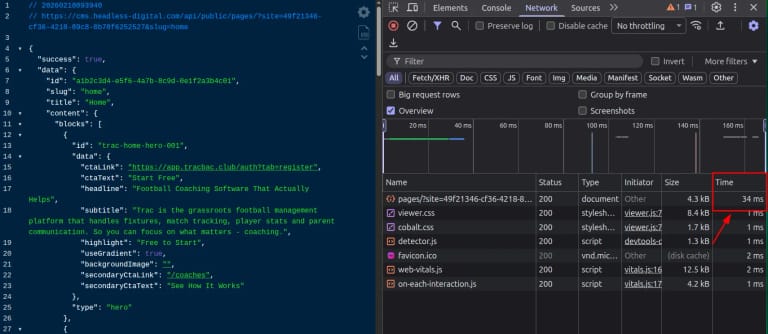
Open the network tab on any HD CMS-powered site and you'll see it in action. The API responses come back in single-digit milliseconds from the edge. The JSON payload is compact, no over-fetching, no nested includes you didn't ask for.
The response headers tell the story: x-vercel-cache: HIT means the edge served a cached response. x-vercel-cache: STALE means it served a stale response and is revalidating in the background. x-vercel-cache: MISS means it hit the origin, usually the first request after a purge or for a URL that hasn't been requested before.
For a typical brochure site, after the initial cache warm-up, virtually every API request is a cache hit. The database is barely touched. The Supabase instance could be on the free tier and you'd never notice, because the edge is doing all the work.
Rate Limiting as a Safety Net
Edge caching handles normal traffic. But what about abuse? A bot hammering the API. A misconfigured client in a loop. Someone running a scraper.
HD CMS has a rate limiting middleware on all public API routes: 200 requests per minute per IP address. Every response includes rate limit headers (X-RateLimit-Limit, X-RateLimit-Remaining, X-RateLimit-Reset) so well-behaved clients can throttle themselves. Exceed the limit and you get a 429 response.
In practice, rate limiting rarely fires because most requests are served from the cache and don't hit the middleware at all. It's a safety net for the origin server, not a regular part of the request flow.
Why Not Redis? Why Not a Custom CDN?
I've built systems with Redis caching layers, Varnish reverse proxies, and custom CDN configurations. They work. They're also things you have to manage, monitor, and pay for.
HTTP caching with s-maxage and stale-while-revalidate requires zero infrastructure. No cache servers to provision. No eviction policies to tune. No cache warming scripts. No memory limits to worry about. The edge network, Vercel, Cloudflare, Fastly, whatever you're using, already has the infrastructure. You just need to set the right headers.
The trade-off is granularity. You can't cache different endpoints for different durations (well, you can, but I chose not to, simplicity wins). You can't cache based on request body or complex conditions. And you're dependent on your hosting provider's caching implementation.
For a CMS serving content to frontends, that trade-off is overwhelmingly worth it. The content doesn't change every second. The API responses are publicly cacheable. And the purge-on-save mechanism means freshness is never more than one save button away.
The Full Flow
Here's what happens end-to-end when content changes:
- Editor saves content in the HD CMS admin panel
- CMS calls the revalidation endpoint with the site ID and a secret token
- Revalidation endpoint purges the Vercel edge cache by site tag, every cached response for that site is invalidated
- Optionally triggers a deploy hook, for static sites that need to rebuild (more on this in a separate note)
- Next visitor request misses the cache, hits the origin, gets fresh content, and repopulates the cache
- All subsequent requests are served from the edge cache again at sub-millisecond latency
The gap between "editor saves" and "visitor sees fresh content" is typically under a second for dynamic sites. For static sites with deploy hooks, it's the build time, usually 30 to 60 seconds.
That's fast enough for any CMS workflow. And the cost of this caching layer? Zero. It's just HTTP headers.