Most headless CMS platforms stop at content. Pages, posts, maybe products if you're lucky. But the businesses I work with, tattoo studios, running coaches, hair salons, they don't just need a website. They need to take bookings.
The usual answer is to bolt on Calendly or Acuity, embed an iframe, and call it done. That works, until it doesn't. You lose control of the experience, the data lives somewhere else, and you're paying a monthly fee for something that's fundamentally just a form with time slots.
So I built it in. HD CMS now has a full booking system as a native add-on. Not a third-party integration. Not an iframe. A proper booking engine that sits alongside your content, uses the same admin panel, and exposes everything through the same API layer.
Here's how it works and why I built it the way I did.
The Add-On Model
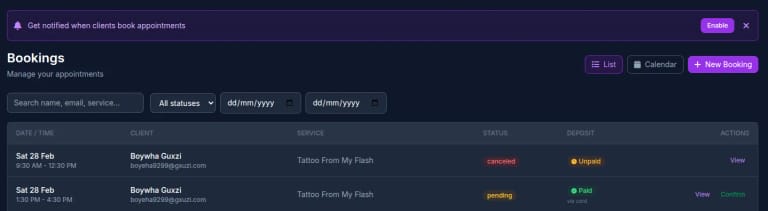
The booking system is an add-on to HD CMS, not baked into the core. Sites that don't need bookings don't carry the weight of it. Sites that do get a dedicated Bookings section in the sidebar with everything they need: a booking list, a calendar view, and a full settings panel.
This matters because a tattoo studio and a photography portfolio have completely different needs. The CMS stays lean, and the booking system is there when it's needed.
Inside, you get the full picture at a glance, date, time, client, service, booking status, and deposit status. Search by name, email, or service. Filter by status or date range. The quick actions let you confirm pending bookings or mark them as complete without drilling into each one.
There's also a prompt to enable push notifications so you get pinged the moment a client books online. That was a must-have, the businesses I build for don't sit at a desk refreshing a dashboard.
Schedule & Availability
The foundation of any booking system is knowing when you're available. The schedule settings let you configure opening hours for each day of the week, with optional break times. Sunday and Monday closed? No problem. Half-hour lunch break? Set it once and the slot generator respects it automatically.
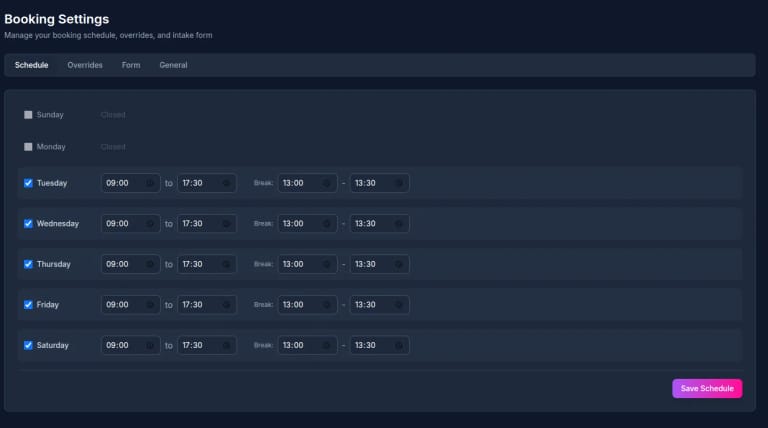
The weekly schedule handles the norm. But real businesses have holidays, one-off closures, and days with different hours. The Overrides tab handles all of that, mark a specific date as closed, set custom hours, add a reason. Overrides always take priority over the weekly schedule.
Behind the scenes, the slot generation algorithm pulls in the weekly schedule, checks for date overrides, factors in the service duration and buffer time between appointments, and cross-references existing bookings. It returns only genuinely available slots, no double-booking, no slots that overlap with breaks, no times within the minimum advance window.
The Calendar View
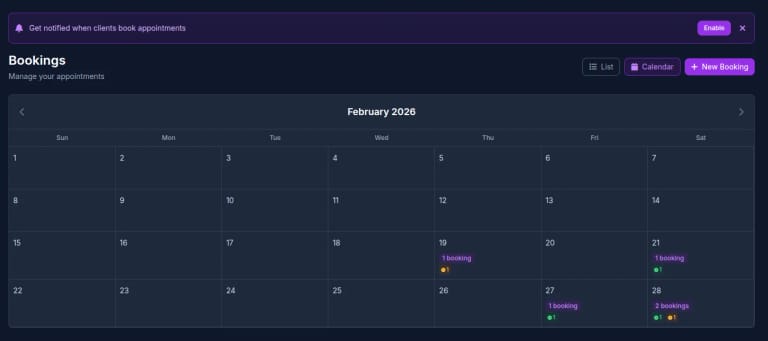
The calendar gives you a month-at-a-glance view of your bookings. Each day shows the booking count and deposit status indicators, green for paid, amber for unpaid. Click a day to filter the list view to that date.
It's deliberately simple. I looked at building a full drag-and-drop week view with time blocks, but for the businesses using this, one or two people taking appointments, a clean monthly overview with a good list view underneath is more practical. You can see your week ahead at a glance and drill into the detail when you need it.
Creating Bookings & The 3-Step Wizard
New bookings use a 3-step wizard: pick a service, pick a date and time, enter client details. It works the same whether a client books themselves through the public API or the business owner creates one manually from the admin panel.
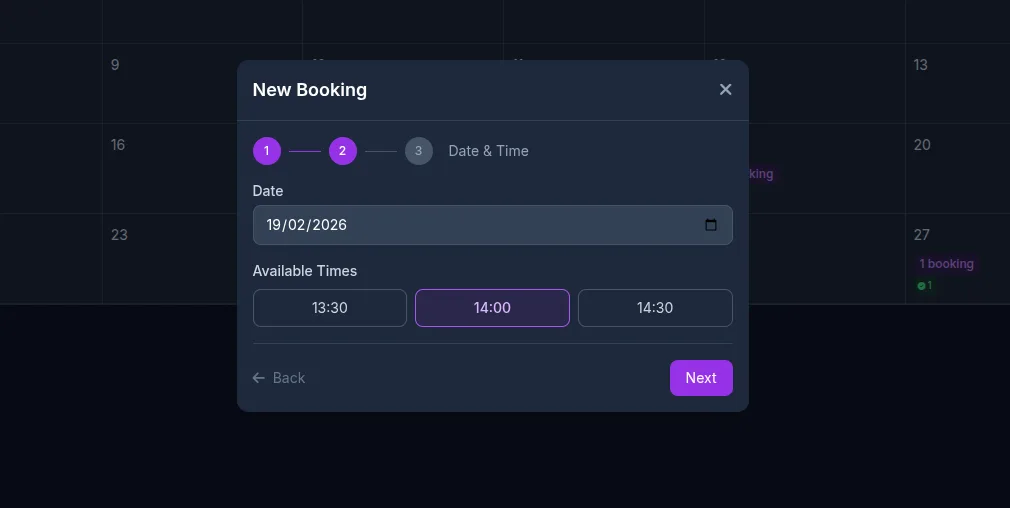
Step 2 shows only the available time slots for the selected date and service. The slot generator runs in real-time, it accounts for the service duration, existing bookings, buffer times, and break periods. If a 3-hour tattoo session is booked at 10am with a 15-minute buffer, the next available slot won't appear until 1:15pm at the earliest.
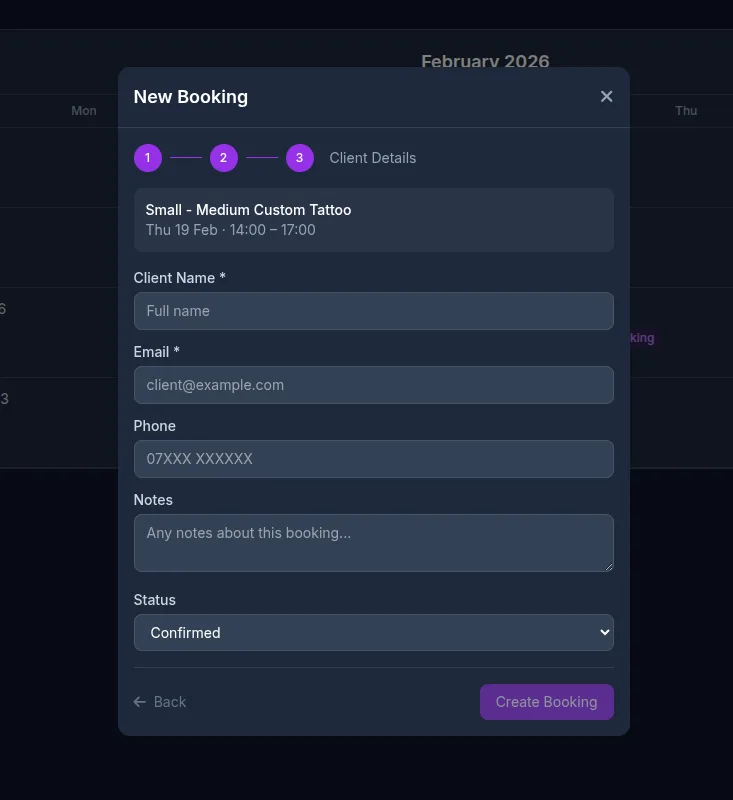
Step 3 captures the client details. The admin can also set the initial status, useful for walk-ins or phone bookings where you might want to mark it as confirmed straight away rather than pending.
Deposits & Payment Tracking
Deposits were a non-negotiable feature. Every tattoo artist I've spoken to has the same problem: no-shows. A deposit doesn't eliminate them, but it dramatically reduces them and at least covers materials and lost time.
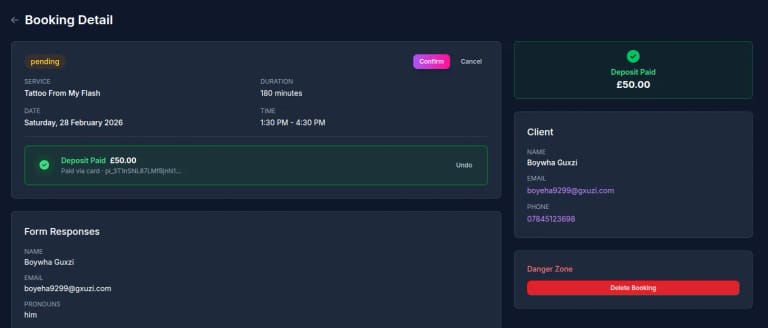
Each service (product) can have its own deposit amount. The system tracks whether the deposit has been paid, how it was paid (card, cash, bank transfer), and shows the Stripe payment intent ID when it's an online payment. The admin can manually mark deposits as paid for offline payments or undo them if needed.
The booking detail page shows everything in one place: the appointment info, payment status with a clear visual indicator, form responses from the intake form, and client contact details with direct email and phone links. Status transitions are handled with contextual action buttons, you can only confirm a pending booking, complete a confirmed one, or mark a no-show.
When a deposit is paid online via Stripe, the webhook updates the booking automatically and fires a push notification to the business owner. No manual checking required.
Custom Intake Forms
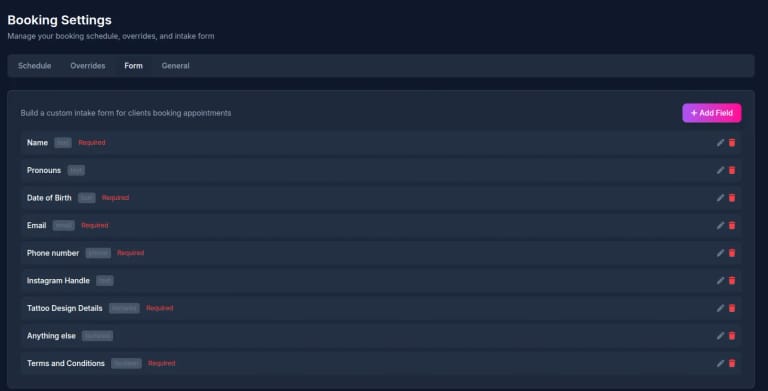
Different businesses need different information upfront. A tattoo studio needs design details, placement preferences, and pronouns. A running coach needs injury history and current fitness level. A hair salon needs to know about allergies.
The Form tab in booking settings lets you build a custom intake form with drag-and-drop field ordering. Supported field types include text, textarea, email, phone, boolean (yes/no checkboxes), and select dropdowns. Each field can be marked as required, given placeholder text, and includes help text for the client.
The responses are stored with the booking and displayed on the booking detail page. The public API endpoint serves the form configuration so the frontend can render it dynamically, no code changes needed when you add or remove a field.
General Settings & Fine-Tuning
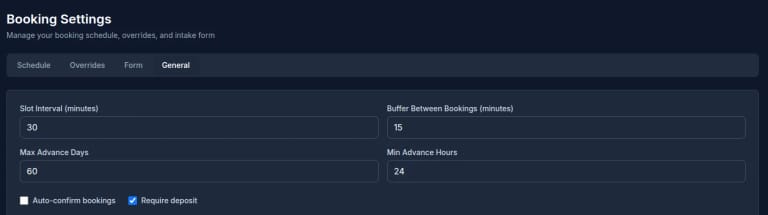
The General tab handles the global booking behaviour. Slot interval controls the granularity of available times (30-minute slots, 15-minute slots, whatever suits). Buffer between bookings adds automatic padding, 15 minutes to clean up, reset, grab a coffee.
Max advance days caps how far into the future clients can book (default 60 days), and min advance hours prevents last-minute bookings (set it to 24 hours and nobody can book for tomorrow morning at 11pm tonight).
Auto-confirm is a toggle: some businesses want to review every booking before confirming, others want it hands-off. Require deposit is another toggle that activates the deposit flow for online bookings via Stripe.
The Public API
Because this is a headless CMS, the booking system is API-first. Five endpoints power the entire client-facing booking experience:
- GET /booking/services, returns all bookable services with pricing, duration, and deposit info
- GET /booking/slots, returns available time slots for a specific date and service
- GET /booking/availability, returns per-date availability for a date range (up to 60 days), with statuses like available, limited, fully booked, or closed, perfect for calendar pickers
- GET /booking/form, returns the configured intake form fields
- POST /booking/create, creates a booking after re-validating slot availability and required fields
The availability endpoint is the one I'm most pleased with. It returns a summary for each date in a range, total slots, available slots, and a status flag. Frontend developers can use it to build a calendar picker that shows availability at a glance without fetching individual slots for every date. It's the kind of detail that makes the difference between a booking widget that feels polished and one that feels clunky.
All of these sit behind the same caching layer as the rest of the HD CMS API, responses are edge-cached with s-maxage and stale-while-revalidate headers, and cache-tagged for instant purging when bookings change.
Real-World Usage
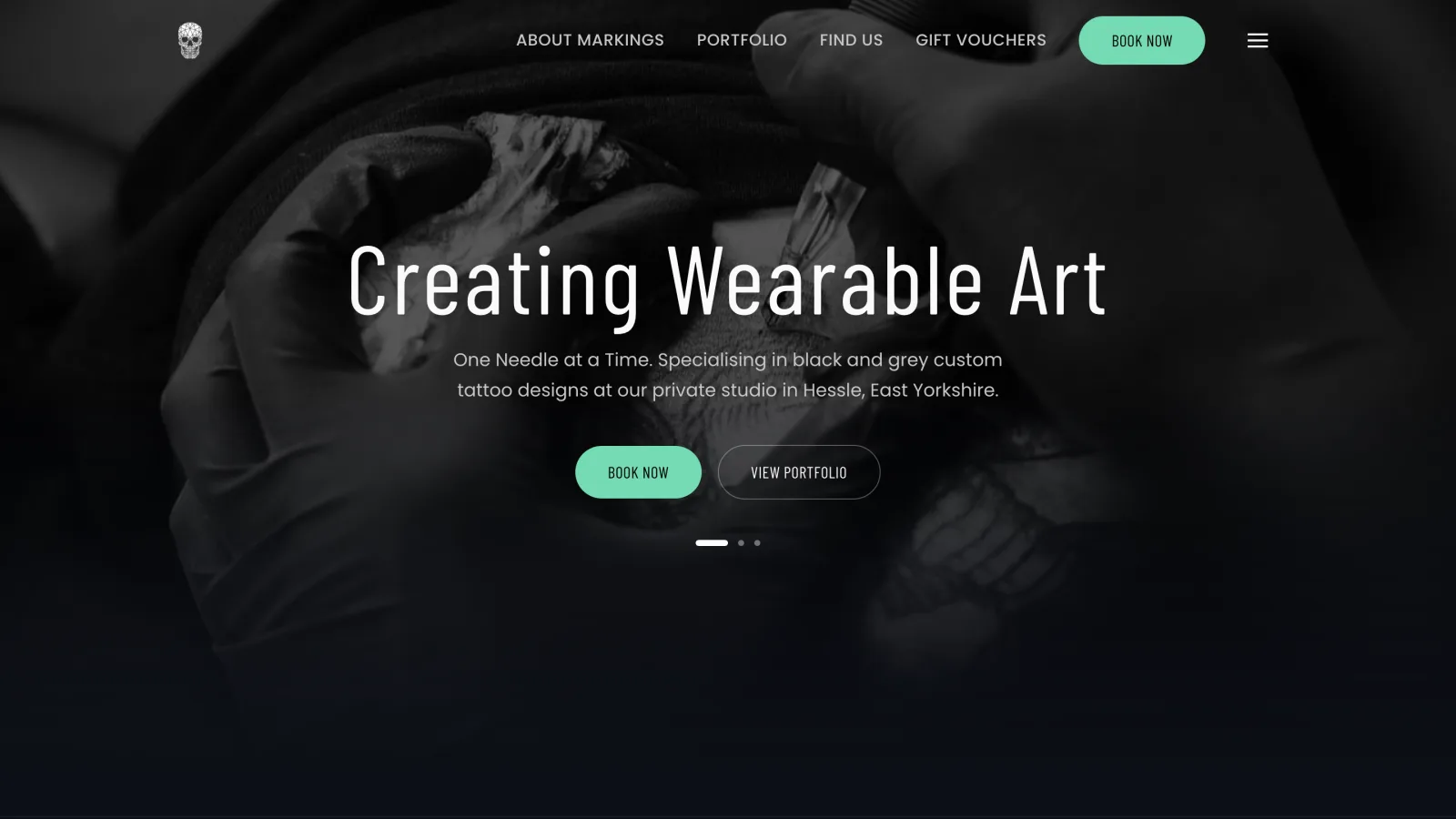
This system is already running in production for a tattoo studio. The intake form captures design details, pronouns, date of birth, and terms acceptance. The deposit requirement has cut no-shows significantly. Push notifications mean the artist knows about new bookings immediately, even when they're working.
The same system could work for any appointment-based service, consultations, personal training, therapy sessions, salon appointments, photography shoots. The custom intake forms and configurable settings make it adaptable without code changes.
How I Built It
The booking system is built with the same stack as the rest of HD CMS: Nuxt 3 on the server, Supabase for the database, and Vercel for hosting. The slot generation algorithm runs server-side and factors in weekly schedules, date overrides, existing bookings, service duration, buffer times, and advance booking limits.
The admin UI uses the same component library as the rest of the CMS, Vue 3 with a dark-themed admin panel. The 3-step booking wizard, calendar view, and settings tabs are all standard Vue components with Pinia stores managing the state.
Push notifications use the Web Push API with VAPID keys. When a booking is created through the public API, the server sends a notification to all subscribed devices for that site. Expired subscriptions are automatically cleaned up.
Stripe integration for deposits uses Checkout Sessions via Stripe Connect, each site has its own connected Stripe account, and deposits are processed with platform fees applied automatically. Webhooks handle the payment confirmation and update the booking record.
The whole thing took about two weeks of focused development. Most of the complexity was in the slot generation, getting the edge cases right (bookings that span break times, buffer overlaps with closing time, midnight boundary handling) required careful testing.
What's Next
Email confirmations are the obvious next step, clients should get a confirmation email with calendar invite attached. SMS reminders before appointments. And a client-facing booking widget component that sites can drop in with minimal configuration.
But the core is solid. It handles the fundamental problem: letting service businesses take bookings through their own website, managed from the same admin panel as their content, without paying for a separate booking platform.
That's the point of HD CMS, give small businesses the tools they actually need, built into one platform they can manage themselves.